
Setup
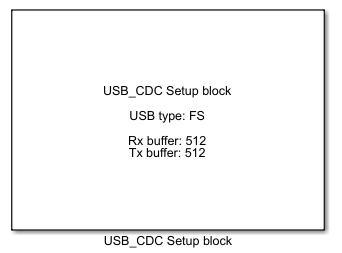
USB CDC Setup block
This block supports USB Device CDC FS/HS interface on STM microcontrollers.
Contents
- Block parameters for USB FS and HS interface
- Workbench/IDE/IAR/Keil Settings settings for STM32H7 USB FS
- CubeMX settings for STM32H7 USB FS
- CubeMX settings for STM32H7 USB HS
- Comments
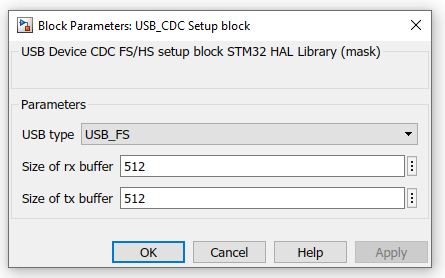
Block parameters for USB FS and HS interface
- USB type – switch between USB FS and HS
- Size of rx buffer – size of buffer for USB CDC receive
- Size of tx buffer – size of buffer for USB CDC transmit
Workbench/IDE/IAR/Keil Settings settings for STM32H7 USB FS
- If it is error 'Error in open port’, please use Relase for building
CubeMX settings for STM32H7 USB FS
- USB_OTG_FS must be set as Device_Only (USB_OTG_FS -> Mode and Configuration -> Phy -> Device_Only)
- USB_OTG_FS -> Parametar Settings -> Speed -> Device Full Speed
- USB_OTG_FS -> Parametar Settings -> Enable internal IP DMA -> Disabled
- USB_OTG_FS -> Parametar Settings -> Low power -> Disabled
- USB_OTG_FS -> Parametar Settings -> Link Power Managmend -> Disabled
- USB_OTG_FS -> Parametar Settings -> Use dedicated end point 1 interrupt -> Disabled
- USB_OTG_FS -> Parametar Settings -> VBUS sensering -> Disabled
- USB_OTG_FS -> Parametar Settings -> Signal start of frame -> Disabled
- USB_OTG_FS -> NVIC Settings -> USB OTG FS global interrupt -> Enabled
- USB_DEVICE -> Mode and Configuration -> Class For FS IP -> Communication Device Class (VCP)
- USB_DEVICE -> Parameter Settings -> USBD_LPM_ENABLED -> 0 Link Power Managmend not support
CubeMX settings for STM32H7 USB HS
- USB_OTG_HS must be set as Device_Only (USB_OTG_HS -> Mode and Configuration -> Phy -> Device_Only)
- USB_OTG_HS -> Parametar Settings -> Speed -> Device High Speed or Device Full Speed
- USB_OTG_HS -> Parametar Settings -> Enable internal IP DMA -> Disabled
- USB_OTG_HS -> Parametar Settings -> Low power -> Disabled
- USB_OTG_HS -> Parametar Settings -> Link Power Managmend -> Disabled
- USB_OTG_HS -> Parametar Settings -> Use dedicated end point 1 interrupt -> Disabled
- USB_OTG_HS -> Parametar Settings -> VBUS sensering -> Disabled
- USB_OTG_HS -> Parametar Settings -> Signal start of frame -> Disabled
- USB_OTG_HS -> NVIC Settings -> USB OTG HS global interrupt -> Enabled
- USB_DEVICE -> Mode and Configuration -> Class For HS IP -> Communication Device Class (VCP)
- USB_DEVICE -> Parameter Settings -> USBD_LPM_ENABLED -> 0 Link Power Managmend not support
Comments
- For use USB CDC Setup block in FS, add two lines in function CDC_Control_FS in file usbd_cdc_if.c:
     extern int8_t USB_CDC_Control_FS(uint8_t cmd, uint8_t* pbuf, uint16_t length);
     USB_CDC_Control_FS(cmd, pbuf, length);

- For use USB CDC Setup block in HS,, add two lines in function CDC_Control_FS in file usbd_cdc_if.c:
     extern int8_t USB_CDC_Control_HS(uint8_t cmd, uint8_t* pbuf, uint16_t length);
     USB_CDC_Control_HS(cmd, pbuf, length);

