
FDCAN Rx
FDCAN Rx block
This block implements receiving data by FDCAN interface on STM microcontrollers.
Contents
- FD CAN Receive block display
- Block parameters for any mode
- Block parameters for enable filter mode
- Type options
- Config FIFO options
- Explain output „Status”
- CubeMX settings STM32H7 for CAN classic frame
FD CAN Receive block display
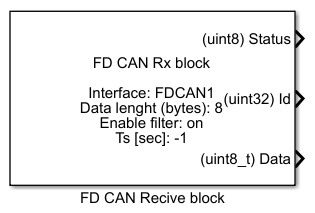
Block parameters for any mode
- Module number – number of CAN module used in model
- Enable filter – enabling/disabling FD CAN filter
- Length of data (bytes) – length of data to receive (maximum 8 bytes)
- Sample time – period of function refreshing (-1 means that a particular block takes sample time from its input block or if it doesn’t have any input block it takes the fastest sample time in a model)
Block parameters for enable filter mode
- Type – type of filter
- Config FIFO – number FIFO to which messages will be stored
- ID1 – id message 1 (in range 0-2047)
- ID2 – id message 2 (in range 0-2047)
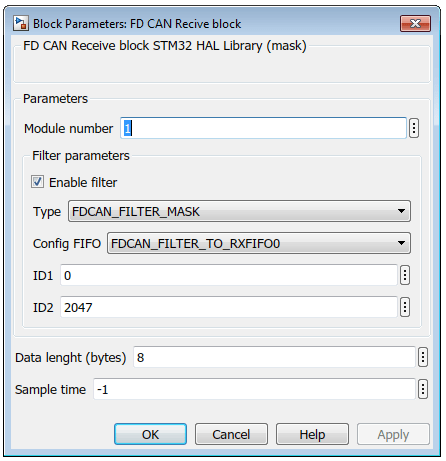
Type options
- FDCAN_FILTER_RANGE – range filter from FilterID1 to FilterID2
- FDCAN_FILTER_DUAL – dual ID filter for FilterID1 or FilterID2
- FDCAN_FILTER_MASK – classic filter: FilterID1 = filter, FilterID2 = mask
- FDCAN_FILTER_RANGE_NO_EIDM – Range filter from FilterID1 to FilterID2, EIDM mask not applied
Config FIFO options
- FDCAN_FILTER_TO_RXFIFO0 – store in Rx FIFO 0 if filter matches
- FDCAN_FILTER_TO_RXFIFO1 – store in Rx FIFO 1 if filter matches
- FDCAN_FILTER_TO_RXFIFO0_HP – set high priority and store in FIFO 0 if filter matches
- FDCAN_FILTER_TO_RXFIFO1_HP – set high priority and store in FIFO 1 if filter matches
Explain output „Status”
- Status „0” – new message is not avalible
- Status „1” – new message is avalible
CubeMX settings STM32H7 for CAN classic frame
- In Pinout card set FDCANx mode at Classic
- In Parameter Settings set Mode as Normal mode
- In Parameter Settings set Auto Retransmission as Enable in Parametrr Settings
- In Parameter Settings set Prescaler, Sync Jump Widtht, Time Seg1 and Seg2 to set the data transmission speed (use webside http://www.bittiming.can-wiki.info/)
- In Parameter Settings set Std Filters Nbr as 128
- In Parameter Settings set Rx Fifo0 Elmts Nbr as 64
- In Parameter Settings set Rx Fifo0 Elmt Size as 8 byts data field
- In Parameter Settings set Rx Fifo1 Elmts Nbr as 64
- In Parameter Settings set Rx Fifo1 Elmt Size as 8 byts data field
- In Parameter Settings set Tx Buffers Nbr as 32
- In Parameter Settings set Tx Fifo Queue Elmts Nbr as at least 100
- In Parameter Settings set Tx Fifo Queue Mode as FIFO mode
- In Parameter Settings set Tx Elmt Size as Enable
- In Parameter Settings set Auto Retransmission as 8 byts data field
- In NVIC Settings set FDCANx interrupt 0 and 1 as Enabled
