
CAN Tx
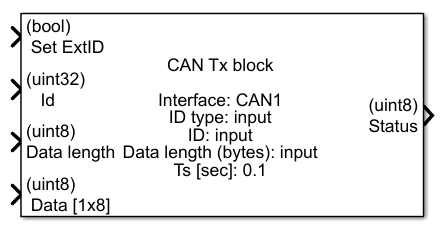
CAN Tx block
This block implements receiving data by CAN interface on STM microcontrollers.
Contents
Inputs
- Set ExtID – option to set Extended ID mode
- Id – Frame Id to send
- Data length – length of data to send
- Data – data to send
Outputs
- Status – status of operation (1 – message sent correctly)
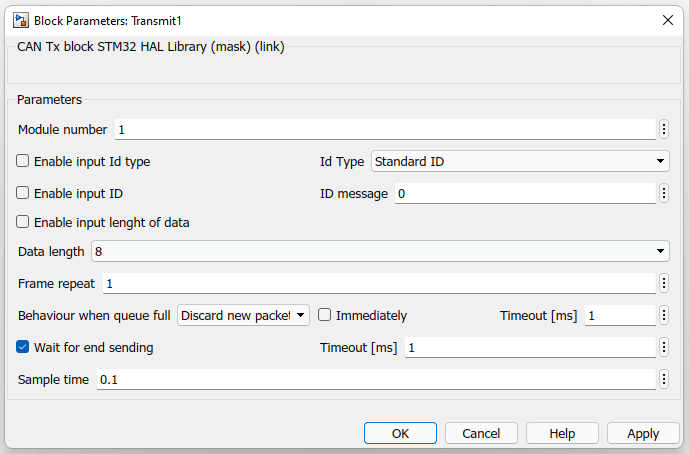
Block parameters
- Module number – number of CAN module used in model
- Enable input Id type – option to set Id mode via input
- Enable input Id – option to set Id via input
- Enable input length of data – option to set data length via input
- Id Type – type of frame Id to send
- ID message – frame Id to send
- Data length – data length to send
- Frame repeat – number of send repetitions
- Behaviour when queue full – determines what to do when tx queue is full (discard new/discard oldest/discard latest)
- Immediately – when unchecked, wait for tx queue free slot until timeout
- Timeout [ms] – timeout to reach when awaiting tx queue free slot
- Wait for end sending – block execution until data tx is done or until timeout
- Timeout [ms] – timeout to reach when awaiting tx done
- Sample time – period of function refreshing (-1 means that a particular block takes sample time from its input block or if it doesn’t have any input block it takes the fastest sample time in a model)
CubeMX settings
- Connectivity->CANx->Activated
- Connectivity->CANx->Parameter Settings tab->Transmit Fifo Priority Enable
- Connectivity->CANx->Parameter Settings tab->Automatic Retransmission Enable
- Connectivity->CANx->NVIC Settings tab->CANx TX interrupts enabled
